Just a quick hit thought on this one. How many times have we seen this discussion play out on the internet:
Person A: Which of these programming languages is faster?
Person B: Neither is really “faster”. The quality of the implementation is orders of magnitude more important than the language.
Person A: OK, but assuming the same quality of implementation, which is faster?
Person B: *sigh* Well in that case…
I present that example with no shade thrown at either side of the discussion. I’ve been, and likely will be, both of those people.
I completely empathize with Person A. There are times when it’s a valid question to ask, especially at the beginning of a project or when deciding what you want to learn about next. Also, sometimes we’re just ignorant.
I also completely empathize with Person B. While many people asking the question already know that implementation matters much more, it’s still important to point it out for the cases when the asker doesn’t already know.
I see this as a failure of language rather than a failure of either person. Any time it’s common that one person needs to add some kind of “you know what I mean” appeal, there’s probably a better way to state it.1
I propose that we change the discussion to be about which language has more performance headroom. This has two main advantages.
The idea of performance headroom bakes in the idea that implementation matters. It may or may not be fast, but it does (or does not) have the headroom.
Performance headroom is a much more concrete concept than quality of implementation. There is probably a correct answers to which programming language has the fastest best-possible implementation of a program. It may be prohibitively complex to ever find or prove that, but it at least exists. Good luck concretely defining, let alone proving, “quality of implementation”.
With this language, the conversation above turns into the following:
Person A: Which of these programming languages is faster?
Person B: The first one has more headroom when used well.
A few weeks ago I decided to try my hand at building my own sorting algorithm. I believe I’ve come up with something useful with a novel trick for adapting to the input data. I’ve decided to call the algorithm YamSort after my wife’s favorite snack food.1
YamSort is a stable sorting algorithm with optimizations for sorted and semi-sorted data, and it works with all comparable data types.
Specifically for the version I’ve created in C#, it works with all types that implement IComparable<T>. It is compatible with .NET Standard 2.1 (with some features only available in .NET 6+). It has a competitive performance profile with the unstable built-in Array.Sort() while being faster than the stable LINQ OrderBy() method in almost all situations.
Performance Analysis
Time Complexity
O(n) – Best case (when data is already sorted)
O(n log n) – Average and worst case
Memory Complexity
O(n) – Uses a single n/2-sized buffer
GC Impact – C# implementation sources the buffer from ArrayPool resulting in zero GC-managed allocations
Benchmark Highlights
1,000,000 Sequential Integers:
YamSort   |   .66 ms
ArraySort |  4.79 ms
OrderBy   | 11.62 ms

1,000,000 Random Integers:
YamSort   | 58.08 ms
ArraySort | 47.24 ms
OrderBy   | 75.97 ms

1,000,000 Near-Sequential Integers:
YamSort   | 13.73 ms
ArraySort | 20.62 ms
OrderBy   | 40.03 ms

Real-World Windows Log File With 109,546 Lines:
YamSort   | 38.63 ms
ArraySort | 66.98 ms
OrderBy   | 59.79 ms
First, install the package from NuGet, or download YamSort.cs from GitHub and copy it into your project.
To use YamSort, import the YamSort namespace and call YamSorter.Sort() on your target array or list. Sorting List<T> requires .NET 6.0 and higher. A separate YamSorter.SortReturning() method is available to return a new sorted collection without modifying the original.
YamSort is a hybrid merge sort that uses a buffered reverse merge2 when merging blocks together and insertion sort to quickly sort small blocks. While the use of reverse merge doesn’t seem to be particularly common, so far, none of this is new.
The part of YamSort that is (as far as I can find) novel, is that there is a check at the halfway point to see how much of the buffer is being used. This data can be used to accurately measure how sorted the two blocks were in the original array.
If the buffer is empty (i.e. every value copied into the buffer went right back into the right side), the data was already sorted in ascending order. If the buffer is still full (i.e. every value from the left side was copied to the right side), that means the data was sorted in descending order. If the buffer is about half full, that is an indicator that the data was random.
YamSort looks for a buffer that is either less than 25% full or greater than 75% full and adjusts a “sequence score” accordingly.
A higher sequence score indicates that the data is typically sorted and increases the threshold for using insertion sort to process small sub-arrays (since insertion sort is very fast on sorted arrays). If the sequence score reaches its maximum value, the reverse merge will enter a galloping mode where it uses a binary search to determine how many values should be moved and then moves them all in a single copy.
As the name implies, galloping mode is adapted from TimSort galloping. Like TimSort, YamSort also uses a threshold of repeated wins by a particular side before engaging the binary search. However, since galloping mode is only possible when there are strong indicators that the data is sorted, YamSort only needs 5 wins in a row to start a binary search (compared to 7 for TimSort).
When the sequence score is low, the data is mostly sorted in descending order. In this case, the threshold for using insertion sort is reduced (reverse sorted is a worst case scenario for insertion sort and takes O(n2) time). Galloping mode is also used at the minimum sequence score.
The result is an algorithm that is able to take advantage of data that is already sorted or close to being sorted while still keeping a simple highly efficient loop to iterate through random data as quickly as possible.
Potential Future Improvements
Parallelization: As a merge sort, YamSort would be fairly easy to parallelize for major performance gains. I’ve confirmed this is a viable path for significant performance improvement, but I haven’t made anything appropriate for release.
Block Partitioning: YamSort focuses on improving the merging process. Other merge sort variants (e.g. TimSort, PowerSort) focus on how to best divide up the blocks to be merged. A naive attempt to tack PowerSort onto the front of YamSort resulted in a significant performance degradation, but there may be some combination that would improve performance.
Duplicate Handling: YamSort’s optimizations are weakest when sorting data with a very large number of repeated values (see binary data benchmarks below). It may be possible to improve this with a separate heuristic that tracks repeated values.
Acknowledgements
Most of the code in YamSort was written by me, but there are a few exceptions.
The insertion sort and binary search algorithms were created by the AI at google.com/ai. I also used AI to help me find opportunities for performance improvements.
The optimized GreaterThan(), LessThan(), and LessThanOrEqual() methods were adapted from code found in ArraySortHelper.cs in the .NET source code. The MoveNansToFront() code came from there as well
Benchmarks
The benchmarks below use nine different data layouts. The code used to generate the data is available in the fuzzing tests on GitHub. All string data is originally generated as integers and then converted to strings.
The data layout types are as follows:
Binary – Random assignment of 0s and 1s
CleanPipeOrgan – Alternating ascending and descending sequential data
ClusteredRandom – Random data using a normal distribution (bell curve)
Random – Each number from 1 to N, in random order
ReverseSequential – Each number from 1 to N, in descending order
SemiPipeOrgan – The same as cleanPipeOrgan, but with ~10% random noise
SemiReverseSequential – Each number from 1 to N, in descending order, with ~10% random noise
SemiSequential – Each number from 1 to N, in ascending order, with ~10% random noise
Sequential – Each number from 1 to N, in ascending order
All benchmarks were run in Windows 11 using a 9800X3D CPU with 32GB RAM.
| YamSort | binary | 100 | 4.982 us | ArraySort | binary | 100 | 3.080 us | OrderBy | binary | 100 | 2.230 us
| YamSort | binary | 1000 | 68.817 us | ArraySort | binary | 1000 | 40.927 us | OrderBy | binary | 1000 | 35.187 us
| YamSort | binary | 10000 | 874.405 us | ArraySort | binary | 10000 | 511.533 us | OrderBy | binary | 10000 | 506.784 us
| YamSort | binary | 100000 | 8,454.605 us | ArraySort | binary | 100000 | 6,170.508 us | OrderBy | binary | 100000 | 7,971.566 us
| YamSort | binary | 1000000 | 80,356.373 us | ArraySort | binary | 1000000 | 70,295.440 us | OrderBy | binary | 1000000 | 80,616.748 us
| YamSort | cleanPipeOrgan | 100 | 7.958 us | ArraySort | cleanPipeOrgan | 100 | 9.132 us | OrderBy | cleanPipeOrgan | 100 | 7.947 us
| YamSort | cleanPipeOrgan | 1000 | 111.232 us | ArraySort | cleanPipeOrgan | 1000 | 211.389 us | OrderBy | cleanPipeOrgan | 1000 | 163.723 us
| YamSort | cleanPipeOrgan | 10000 | 1,176.438 us | ArraySort | cleanPipeOrgan | 10000 | 3,483.968 us | OrderBy | cleanPipeOrgan | 10000 | 2,828.860 us
| YamSort | cleanPipeOrgan | 100000 | 12,151.822 us | ArraySort | cleanPipeOrgan | 100000 | 43,709.043 us | OrderBy | cleanPipeOrgan | 100000 | 37,585.503 us
| YamSort | cleanPipeOrgan | 1000000 | 118,018.825 us | ArraySort | cleanPipeOrgan | 1000000 | 523,077.560 us | OrderBy | cleanPipeOrgan | 1000000 | 435,292.773 us
| YamSort | clusteredRandom | 100 | 12.045 us | ArraySort | clusteredRandom | 100 | 13.447 us | OrderBy | clusteredRandom | 100 | 10.374 us
| YamSort | clusteredRandom | 1000 | 219.197 us | ArraySort | clusteredRandom | 1000 | 237.566 us | OrderBy | clusteredRandom | 1000 | 211.553 us
| YamSort | clusteredRandom | 10000 | 3,020.525 us | ArraySort | clusteredRandom | 10000 | 3,024.785 us | OrderBy | clusteredRandom | 10000 | 2,821.043 us
| YamSort | clusteredRandom | 100000 | 42,783.658 us | ArraySort | clusteredRandom | 100000 | 39,208.670 us | OrderBy | clusteredRandom | 100000 | 37,777.820 us
| YamSort | clusteredRandom | 1000000 | 569,292.155 us | ArraySort | clusteredRandom | 1000000 | 563,054.147 us | OrderBy | clusteredRandom | 1000000 | 589,129.593 us
| YamSort | random | 100 | 10.941 us | ArraySort | random | 100 | 16.151 us | OrderBy | random | 100 | 12.117 us
| YamSort | random | 1000 | 213.517 us | ArraySort | random | 1000 | 277.593 us | OrderBy | random | 1000 | 218.802 us
| YamSort | random | 10000 | 3,323.035 us | ArraySort | random | 10000 | 3,845.297 us | OrderBy | random | 10000 | 3,228.699 us
| YamSort | random | 100000 | 47,121.986 us | ArraySort | random | 100000 | 50,942.557 us | OrderBy | random | 100000 | 45,732.128 us
| YamSort | random | 1000000 | 611,711.273 us | ArraySort | random | 1000000 | 637,755.573 us | OrderBy | random | 1000000 | 610,211.300 us
| YamSort | reverseSequential | 100 | 8.260 us | ArraySort | reverseSequential | 100 | 12.426 us | OrderBy | reverseSequential | 100 | 9.619 us
| YamSort | reverseSequential | 1000 | 64.349 us | ArraySort | reverseSequential | 1000 | 227.615 us | OrderBy | reverseSequential | 1000 | 175.882 us
| YamSort | reverseSequential | 10000 | 620.519 us | ArraySort | reverseSequential | 10000 | 3,233.899 us | OrderBy | reverseSequential | 10000 | 2,552.798 us
| YamSort | reverseSequential | 100000 | 6,700.616 us | ArraySort | reverseSequential | 100000 | 41,668.327 us | OrderBy | reverseSequential | 100000 | 34,055.957 us
| YamSort | reverseSequential | 1000000 | 61,783.975 us | ArraySort | reverseSequential | 1000000 | 502,436.254 us | OrderBy | reverseSequential | 1000000 | 406,804.467 us
| YamSort | semiPipeOrgan | 100 | 7.945 us | ArraySort | semiPipeOrgan | 100 | 10.311 us | OrderBy | semiPipeOrgan | 100 | 8.888 us
| YamSort | semiPipeOrgan | 1000 | 151.890 us | ArraySort | semiPipeOrgan | 1000 | 212.868 us | OrderBy | semiPipeOrgan | 1000 | 165.292 us
| YamSort | semiPipeOrgan | 10000 | 2,202.778 us | ArraySort | semiPipeOrgan | 10000 | 3,527.220 us | OrderBy | semiPipeOrgan | 10000 | 3,077.139 us
| YamSort | semiPipeOrgan | 100000 | 24,073.425 us | ArraySort | semiPipeOrgan | 100000 | 47,788.368 us | OrderBy | semiPipeOrgan | 100000 | 42,056.660 us
| YamSort | semiPipeOrgan | 1000000 | 251,988.904 us | ArraySort | semiPipeOrgan | 1000000 | 549,471.307 us | OrderBy | semiPipeOrgan | 1000000 | 484,366.147 us
| YamSort | semiRevSequential | 100 | 11.302 us | ArraySort | semiRevSequential | 100 | 13.454 us | OrderBy | semiRevSequential | 100 | 10.235 us
| YamSort | semiRevSequential | 1000 | 132.868 us | ArraySort | semiRevSequential | 1000 | 251.783 us | OrderBy | semiRevSequential | 1000 | 194.053 us
| YamSort | semiRevSequential | 10000 | 1,737.792 us | ArraySort | semiRevSequential | 10000 | 3,481.142 us | OrderBy | semiRevSequential | 10000 | 2,823.976 us
| YamSort | semiRevSequential | 100000 | 19,317.816 us | ArraySort | semiRevSequential | 100000 | 44,755.508 us | OrderBy | semiRevSequential | 100000 | 37,333.859 us
| YamSort | semiRevSequential | 1000000 | 202,776.662 us | ArraySort | semiRevSequential | 1000000 | 532,344.362 us | OrderBy | semiRevSequential | 1000000 | 447,593.136 us
| YamSort | semiSequential | 100 | 8.255 us | ArraySort | semiSequential | 100 | 13.689 us | OrderBy | semiSequential | 100 | 10.527 us
| YamSort | semiSequential | 1000 | 104.116 us | ArraySort | semiSequential | 1000 | 237.506 us | OrderBy | semiSequential | 1000 | 184.912 us
| YamSort | semiSequential | 10000 | 1,446.836 us | ArraySort | semiSequential | 10000 | 3,454.293 us | OrderBy | semiSequential | 10000 | 2,808.580 us
| YamSort | semiSequential | 100000 | 16,553.962 us | ArraySort | semiSequential | 100000 | 44,434.623 us | OrderBy | semiSequential | 100000 | 37,199.184 us
| YamSort | semiSequential | 1000000 | 175,861.924 us | ArraySort | semiSequential | 1000000 | 538,733.329 us | OrderBy | semiSequential | 1000000 | 449,419.187 us
| YamSort | sequential | 100 | 6.975 us | ArraySort | sequential | 100 | 13.534 us | OrderBy | sequential | 100 | 10.372 us
| YamSort | sequential | 1000 | 69.001 us | ArraySort | sequential | 1000 | 228.243 us | OrderBy | sequential | 1000 | 176.490 us
| YamSort | sequential | 10000 | 551.751 us | ArraySort | sequential | 10000 | 3,234.612 us | OrderBy | sequential | 10000 | 2,551.606 us
| YamSort | sequential | 100000 | 5,653.712 us | ArraySort | sequential | 100000 | 41,445.056 us | OrderBy | sequential | 100000 | 33,531.227 us
| YamSort | sequential | 1000000 | 54,925.383 us | ArraySort | sequential | 1000000 | 503,933.092 us | OrderBy | sequential | 1000000 | 405,102.529 us
Real-World String Results:
LogStrings1 – 16.0MB log file with 109,546 lines
LogStrings2 – 4.14MB log file with 14,662 lines; ~85% (est) of the lines are one of two common lines
Neither log file contains timestamps (i.e. they are not already sorted)
| Method    | DataLayout  | N   | Mean

| YamSort   | logStrings1 | 100 | 38.63 ms
| ArraySort | logStrings1 | 100 | 66.98 ms
| OrderBy   | logStrings1 | 100 | 59.79 ms

| YamSort   | logStrings2 | 100 | 15.46 ms
| ArraySort | logStrings2 | 100 | 22.34 ms
| OrderBy   | logStrings2 | 100 | 22.96 ms
At least once a week, I slice up sweet potatoes that she roasts in the oven and keeps as a snack… but SweetPotatoSort doesn’t roll off the tongue quite the same (and us Americans don’t really know that sweet potatoes and yams technically aren’t the same thing☺). Also, it’s Yet Another Merge sort. ↩︎
A buffered reverse merge copies the smaller of two pre-sorted blocks into a buffer and then fills in the remaining values from right to left by continuously comparing the highest value remaining in both the buffer and the half of the original array that was not copied to the buffer. In the case of YamSort, the size of the right side is always equal to or smaller than the left side. This frees the right side to be immediately overwritten.
I’m working on a project right now that uses Cassandra as one of it’s databases, and I need to determine how I’m going to bucket my data. Unfortunately, the most common bucketing solutions have significant limitations in my use case.
I’d like to propose a new way to bucket data that uses a probabilistic method to get an approximate count for when a new bucket should be created.
Quick Cassandra Bucketing Background
If you already understand how Cassandra partitioning and bucketing work, feel free to skip to the next section. For everyone else, here’s a quick high level overview to set the stage.
Cassandra breaks the traditional database model by structuring data in a way that is tailored to a particular query (or narrow set of queries). This requires determining ahead of time how your data will be accessed, but it rewards the effort with massive gains in throughput for that narrow set of queries.1
As part of the setup, all Cassandra tables need to define a column, or columns, that will be used used to determine which “partition” each row of data belongs to. Cassandra will ensure all data in the same partition is stored on the same nodes, so queries for information in a single partition can be accomplished quickly. Cassandra will also automatically distribute the partitions across it’s nodes pseudo-evenly with a hashing algorithm for the sake of load balancing. When set up properly, read queries should only be pulling information from a single partition. Queries that cross partitions will be significantly slower than those that come from a single partition.2
Getting the partitions “right-sized” is important. Performance degrades if the partitions get too large. Cassandra can officially hold 2 billion rows per partition, but the practical limit is 100MB of data per partition. Very small partitions can also be a problem by causing additional overhead in the hashing/node lookup process, so it’s typically not a good idea to set up your data in a way that only has a few dozen (or fewer) rows per partition. However, it’s not as much of a performance concern as oversized partitions.
The limit on the minimum size for a partition is typically something more practical. Since we want to make sure our read queries are only hitting a single partition whenever possible, all of the data that is queried together needs to be partitioned together. In most cases, this is the requirement that forces partition sizes to increase. This can be a problem when you have an indefinite stream of data going into a single table. For example, suppose you are logging data from a group a sensors. You could partition out the data for each sensor (perhaps by a sensor ID column), but eventually, the stream of information from even a single sensor is going to exceed the 100MB soft-limit.
This is where bucketing comes in. Bucketing is where you add another column that’s sole purpose for existence is to break up the partitions. These generally fall into one of two categories, time-based, and count-based. Both have their own advantages and disadvantages.
Time-based is the simplest solution and works by using the extra bucketing column to break up the partitions by time. Using the sensor example from above, you could have a bucket column that is just a numerical representation of the month and year the data was logged (e.g. “202602”). This would automatically create a new partition for the sensor data every month when the bucket value changes.3 This can easily be tuned based on the expected rate of data (e.g. daily, yearly, every 6 hours, etc).
Time-based approaches have a major drawback though. What they gain in simplicity, they lose in adaptability. What if your the rate of data from your sensor is highly variable? What is sometimes you may get 50MB in a hour, but other times, it may take a month, or longer to get that much information? In this case, you’re basically forced to use hourly bucketing because the drawbacks of oversized partitions are greater than the drawbacks of undersized partitions, but there is still going to be weakness. Future queries for data from that sensor may need to iterate through dozens of partitions for adequate data. This is where count-based strategies come in.
In count-based bucketing strategies, we fix this problem by simply counting the number of rows that are added to the database and switching to a new bucket exactly when the partition is right-sized. In the sensor example above, lets assume the average sensor entry is 1KB and we want to target a 10MB partition size. That means we want 10,000 entries in each partition, so we’ll just take the entry count, divide by 10,000, round down, and that will be the entry in our bucket column. Easy-peasy right-sized buckets! So what’s the problem here?
The problem is that keeping track of the entry count comes with it’s own overhead. Cassandra doesn’t inherently keep track of the number of rows in each partition, and doing so in an additional database can potentially create an additional workload that is orders of magnitude larger than the main data load itself. Depending on how your data is distributed, and how critical it is that every database user gets the exact same information, it may also be necessary to implement some kind of locking mechanism to ensure that only one user can be inserting data at a time.
There are times when this is still a viable strategy, particularly when you already create an incrementing item number for some other purpose (e.g. an order number), but there are plenty of other times where using a count-based strategy entirely negates the throughput benefits you may have hoped to get from using Cassandra in the first place.
In this blog post, I suggest a third strategy.
The Idea of Probabilistic Bucketing
Time-based and count-based bucketing solutions are perfectly acceptable in many cases, but there is one situation where both of them fall short: when the rate of information flow is highly-variable, highly-unpredictable, and too large for efficient counting. Such situations are fairly common.
As a specific example, Discord used Cassandra (and now uses ScyllaDB, a Cassandra clone) in exactly this kind of situation. There is no way for Discord to accurately predict the flow of messages into each chat server. Some servers are going to be orders of magnitude more active than others. Some servers are going to have significant spikes in activity at times that are unpredictable (for Discord at a large scale). Their solution was to tune a time-based solution for the most active servers, and accept the performance cost in less active servers (since, ya know, they’re less active anyway).
I’m facing a very similar challenge, but I wanted to avoid the problem of tiny/empty partitions.
I decided to use a modified count-based solution where I only occasionally increment the count based on a random factor.
For example, in my case, the item ID numbers that I’m already generating end with several bytes of random data. I can just look at 9 bits of random data and increment the count if those bits are all 1s. This means I’ll be incrementing the counter an average of 1 time for every 512 inserts.
I can then increment the bucket when the count reaches 40. This gives me about a 1 in 1 quadrillion chance that I will have either less than 4,200 or greater than 58,000 rows in the partition when the bucket increments. Both of of those extremes are acceptable outcomes. In the more common cases, it’s around 1 in 1,000 that there will be fewer than 12,000 rows or greater than 32,000 rows in given partition. That’s a pretty good range!
The numbers can also be tuned for different desired outcomes. Increasing the likelihood of incrementing the counter (e.g. looking at fewer bits of random data) will improve the ability to target narrower partition size ranges, but will increase the load on the row counter. Changing the target count will, obviously, increase and decrease the upper and lower range of likely partition sizes. 1/512 and 40 work well for me.4
It’s essentially still a count-based bucketing strategy, but the counter is incremented substantially fewer times.
A quick summary of options:
Time-Based
Pros
Simple
No counting overhead
Cons
Prone to tiny and/or empty buckets
Best For
Situations with consistent data flow
Count-Based
Pros
Precise bucket sizing
Predictable partition transitions
Cons
Significant counting overhead
Best For
Situations where the count is tracked anyway
Situations where bucket sizing is critical and the overhead is worth it (although I’d consider if Cassandra is really the right DB in this case)
Probabilistic-Based
Pros
No tiny/empty buckets
Massive reduction in counting overhead
Cons
Less control over bucket sizing
More complex to coordinate in distributed environments
Best For
Situations with unpredictable and highly-variable data flows
Probabilistic Bucketing Implementation
In a situation where only one process is ever accessing the data, implementing the counter is fairly simple. Some pseudocode:
In a distributed environment, additional coordination logic will be necessary to make sure all of the agents querying the database will swap to the new bucket at the same time. This could be accomplished with locking. I have another solution that I haven’t been able to test effectively (i.e. in an actual distributed environment), so I’ll relegate it to a footnote.5
A real solution is likely to have some kind of caching in place as well, so a more real implementation will probably look more like this:
On the read query side, it’s also pretty straightforward. There is a possibility that your results will be split across two partitions (i.e. the current bucket and the prior bucket). There are two basic approaches to accounting for this. You can preemptively query both partitions and stitch the information together, or you can query the current partition, count the results, and then query the prior partition when necessary. I decided to go with the later because I expect that one query will be enough in most cases.
The need to check multiple partitions is similar to time-based bucketing, with two key advantages. First, you automatically know you are at the end of the results, and don’t need to query a prior partition, when the current bucket is 0. Second, it’s less likely that you will even need to search additional partitions, and in the case that you do, it’s essentially certain that you will only need to check one additional partition for the required number of rows (unless you are requesting a very large number of rows).
Highly variable and highly unpredictable data flow environments are typically the worst-case scenario for Cassandra bucketing strategies. I believe that this probabilistic bucket strategy is able to provide a “best of both worlds” solution to this problem.
It eliminates the tiny/empty partition problem of time-based bucketing strategies while massively reducing the overhead in count-based bucketing strategies. The main drawbacks are limited control over partition sizing (relative to count-based solutions) and that it doesn’t eliminate the requirement for external counting infrastructure (relative to time-based solutions).
It’s not a perfect strategy that fits all situations, but I believe there is a niche out there that desperately needs a better solution, and that probabilistic bucketing can be that solution.
It also means that other queries outside of that narrow range will be prohibitively slow, so plan carefully. 🙂 ↩︎
In cases where you need data from multiple partitions, it’s better to have your application send separate queries for each partition. Another consideration during setup is “clustering”, which essentially pre-sorts the data based on a designated column (or columns). Clustering is also critical for performance, but it’s not particularly relevant to bucketing. ↩︎
Cassandra routes insert queries to the appropriate partition on the fly. If an insert needs to go to a partition that doesn’t exist, it just creates the partition. In this example, where the partition is determined by the sensor’s ID and a bucket value, when a new insert shows up at the beginning of the month with the same sensor ID and new bucket value, it automatically starts putting the new data in a new partition. ↩︎
Handy Excel formula for working this out:
=BINOM.DIST($count-1, $target, $odds, TRUE)
$count = count when bucket will be incremented (e.g. 40) $target = target number of rows to check $odds = odds of incrementing the counter on any given insert (e.g. 1/512)
For example, entering =BINOM.DIST(40-1, 20000, 1/512, TRUE) shows that the there is a 53.85% chance, with my selection of 512 and 40, that any particular partition will have more than 20,000 rows. ↩︎
My solution adds a virtual “Bucket State” to each bucket count tracker. Every bucket will be in one of three states, “Steady State”, “Pre-Change”, or “Post-Change”. The buckets don’t actually have any kind of state property in the database. Rather, the state is implied based on the values in lastChange and nextChange properties that are stored in the database. Most of the time, buckets are in Steady State.
When the bucket change counter number is reached, the bucket is moved into a Pre-Change state. A future nextChange time is set and the bucket is incremented, but the counter is not reset. In this state, all agents continue to use the prior bucket (i.e. “bucket – 1”) until the nextChange time is reached.
At the nextChange time, the bucket moves into Post-Change state. In this state, all agents start using the new bucket number. The first agent to access the bucket will reset the counter to 0. There is a possibility that several agents will reset the counter to 0 at the same time, but that’s inconsequential (and preferred to the overhead of a formal locking system). After the counter is reset, the bucket is consider to be in Steady State again.
I use a local cache for bucket data that is critical for ensuring all agents swap buckets at the same time. The nextChange property is set to ensure that, by the time the bucket changeover happens, all caches will have either have retrieved the Pre-Change state (including the nextChange time) or will have stale enough data that they’re going to request fresh bucket data from the database anyway. ↩︎
With the recent Windows 10 EOL, I decided to migrate my home server back to Ubuntu.1
The server is mainly used as a NAS file share, but I also occasionally use it for hosting web development projects. It’s only used periodically, and I prefer that it automatically go sleep when not in use. As anyone who has been in a similar situation before can tell you, that’s a lot more difficult to achieve than it seems like it should be.
I was using a script on Windows 10 that would periodically update the sleep timeout based on if any files were being accessed, but I quickly realized that wouldn’t be possible on Ubuntu(more on that later).
I turned to Google, and found this outstanding blog post by Daniel Gross on how to set up a Linux server to automatically go to sleep and wake up on demand. It’s a great guide, but I wanted a few things that his method didn’t account for:
I needed something with a cool-down period before going back to sleep (e.g. wait an hour after the last file access before going back to sleep)
I didn’t want to shift from one always-on piece of hardware to another always-on piece of hardware, even if the new one uses less power
I didn’t want external hardware requirements at all… I don’t own a Raspberry Pi, and if my ISP-provided router doesn’t support unicast wake-on-LAN packets, I need to add an additional router to the list of extra hardware that will be running all the time
I’d also ideally like to keep IPv6; it’s a minor thing, but I’d prefer not to contribute to the propagation of old standards if I can
I was also willing to compromise on the following:
I was already set up for, and used to using, manual wake-on-LAN, so continuing to do that was no big deal
My Solution
I’ll talk more about the process below, but to avoid burying the lede any further, here’s the solution:
1. Enable Wake-On-LAN (WoL)
The method Gross outlined to enable WoL wouldn’t persist for me (i.e. WoL kept turning back off). After trying several different solutions suggested by the internet (that also wouldn’t persist), I found that Ubuntu, as of at least Ubuntu 24.04, has a setting in the GUI that allows you to just turn it on.2
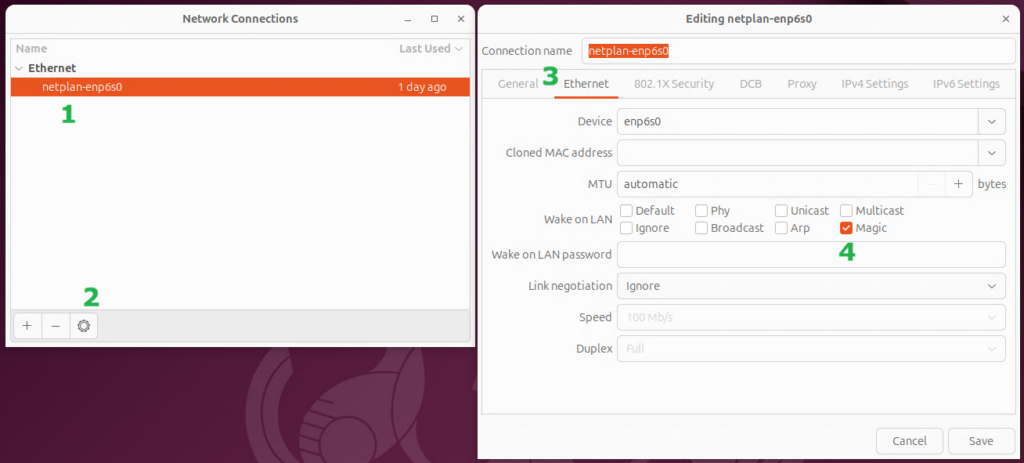
You will need to open the Advanced Network Configuration app then (1) select your network adapter, (2) open the settings for the adapter, (3) go to the “Ethernet” tab, and (4) enable WoL by magic packet (or any other desired option).
You will also need to make sure that WoL is enabled in the server’s BIOS/UEFI settings, and that your router isn’t blocking it.
2. Copy this Python Script
Create a file with the script below somewhere on your server. This script works in Ubuntu 24.04 (and likely newer) when using the GNOME desktop environment.
import subprocessfrom sys importexit# Amount of minutes between each execution of this script# **Important** The same interval must be set in the cron jobRUN_INTERVAL = 10# Amount of idle minutes until the system should be suspendedTIMEOUT = 60defCmdToInt(cmd):try: output = subprocess.check_output(cmd, shell=True, text=True)returnint(output.strip())except subprocess.CalledProcessError as e:ifstr(e) == "Command 'cat /var/tmp/suscount' \returned non-zero exit status 1.": WriteCount(0)return0else:print(f"Error running command: {e}")exit(1)exceptValueError:print("Command output was not a valid number.")exit(1)defCheckIdleTimes(): cmd = "loginctl list-users | grep -v 'LINGER STATE' | \ grep -v 'users listed' | awk '{print $2}'" user_list = subprocess.check_output(cmd, shell=True, text=True) min_idle = (TIMEOUT * 2) * 60000for user in user_list.splitlines():if user == "":continue user_idle = GetIdleTime(user)if user_idle < min_idle: min_idle = user_idlereturn min_idledefGetIdleTime(user): cmd = f"pgrep -u {user} gnome-shell | head -n 1" pid = subprocess.check_output(cmd, shell=True, text=True).strip() cmd = f"sudo grep -z DBUS_SESSION_BUS_ADDRESS /proc/{pid}/environ\ | cut -d= -f2-" bus = subprocess.check_output(cmd, shell=True, text=True) bus = bus.strip().replace('\x00', '') cmd = f"sudo -u {user} DBUS_SESSION_BUS_ADDRESS=\"{bus}\" gdbus call \ --session --dest org.gnome.Mutter.IdleMonitor \ --object-path /org/gnome/Mutter/IdleMonitor/Core \ --method org.gnome.Mutter.IdleMonitor.GetIdletime" raw_time = subprocess.check_output(cmd, shell=True, text=True).strip()returnint(raw_time[8:-2])defWriteCount(count):withopen("/var/tmp/suscount", "w") as file: file.write(str(count))counter = CmdToInt("cat /var/tmp/suscount")# ##################################################################### ######### Commands to Check for Relevant System Activity ############ ####################################################################shared = CmdToInt("lsof -w | grep /srv/samba/shared_folder/ | wc -l")web = CmdToInt("ss -an | grep -e ':80' -e ':443' | \ grep -e 'ESTAB' -e 'TIME-WAIT' | wc -l")backup = CmdToInt("ps -e | grep 'duplicity' | wc -l")logged_in = CmdToInt("who | wc -l")####################################################################### ## The If-Statement Below Needs to be Tailored to Each Use Case ##########################################################################if (shared + web + backup + logged_in) > 0: #True if activity detectedif counter > 0: WriteCount(0)exit(0)counter += 1WriteCount(counter)idle_mins = CheckIdleTimes() // 60000if idle_mins < (counter * RUN_INTERVAL): counter = idle_mins // RUN_INTERVALif (counter * RUN_INTERVAL) >= TIMEOUT: WriteCount(0) subprocess.run("systemctl suspend", shell=True, text=True)exit(0)
3. Customize the Script
This script needs to be customized in 4 ways:
Set the “RUN INTERVAL”: This represents the time, in minutes, between each time the script is run. This same number will be set in a cron job later.
Set the “TIMEOUT”: This is how long the computer needs to be inactive before it will be suspended. It won’t be suspended exactly at this time, but rather the first time the script runs when it has been inactive for at least this long.
Configure the commands that will check for activity: This is the most complicated part of the setup and requires some familiarity with Python and using the Linux command line interface. Each command should return an integer value that can be stored for later. I have four commands that check for activity:
The first checks if there are any active connections to my file share folder. If you are looking for the same functionality, just change “/srv/samba/shared_folder/” to the path of your shared folder.
The second checks if there are any active web connections. This command should be fairly universal for that purpose, presuming standard settings (e.g. using default ports).
The third checks if a duplicity backup is in progress, so I won’t have the server go to sleep mid-backup. In my case, duplicity initiates web connections that will be caught by the prior command, but I figured it’s best to explicitly check for this anyway, just to be sure. This command can search for any program by replacing “duplicity” with the name of the program you are looking for.
The fourth command checks if anyone is logged in to the server. This command should also be universal for this purpose.
All of the commands end with “| wc -l“, which counts the number of lines returned by the preceding parts of the command. This is what converts it into number for the python script.3
The if statement that determines if activity was detected may need to be modified. In my case, all of the commands will result in 0 if no activity is detected. As long as all of my results add up to 0, nothing was detected. However, there may be other commands that always have results, and anything above a particular baseline would indicate activity. The if statement would need to be tailored to that situation.
After all of the above is complete, the script will check the idle time for anyone logged into a desktop session and adjust as necessary. This will also detect any recent activity at the login screen.
4. Ensure the File is Executable
Once the script is tailored to your situation, make sure the file is executable:
sudochmod+x/your_path/your_filename
5. Create a Cron Job
Finally, create a cron job to actually run the script at regular intervals. Use the following command edit the root cron job list:
sudocrontab-e
And then add the following line (with the correct path and filename). You must use full absolute paths because the script won’t be run from your current working directory. If entered as it is below, the python script will be run every 10 minutes. It’s also possible that python3 will be at a different path, but this is where it should be with a standard Ubuntu installation.
As I mentioned above, I previously used a script on Windows to adjust the sleep timeout based on file share activity.
The script worked like this: if activity was detected, it would set the sleep timeout to 0 (i.e. disable sleep). If no activity was detected, it would set the sleep timeout to 61 minutes. This script was scheduled to run every 15 minutes, so if there was no activity four consecutive times, the computer would go to sleep 1 minute later.
I quickly learned a similar approach wouldn’t work with Ubuntu.
The automatic sleep function in Ubuntu isn’t a system-wide setting. Rather it is set per user, and it is only checked when that user is logged into a desktop session. It’s rare for anybody to directly log into the server, so that wasn’t looking promising.
There is a user, “gdm”, that is responsible for managing the login screen, and changing that user’s settings can make it automatically go to sleep. However, changing that user’s power profile settings requires resetting the user’s session… and resetting the user session resets the idle time… and regularly resetting the idle time ensures you’ll never hit your sleep timeout.
Also, none of the above accounts for things like “don’t go to sleep when you are running a backup” at all! It only checks if there has been any activity on the desktop.
I needed a completely new approach.
I decided it would be best to just make a python script to do exactly what I wanted directly.
After getting the basic shell of the script set up to run commands and use an additional file to track how how long it’s been since the script detected any activity, I needed to figure out which commands would detect any relevant server activity. Daniel Gross’s method uses a command that can give information about logged in users, so I copied that model for the rest of my approach.
Google was quick to find me a command that could list files that were in use. It took a bit more manual work to tune the commands for finding what web sessions are active and when a backup is running, but those weren’t too difficult either.
The biggest challenge was trying to figure out the system’s current overall idle time. As mentioned above, Ubuntu tracks a separate idle time for each user, and that information is not readily exposed.
If you try to search the internet for guidance on how to check the current idle time for other users, you are likely to receive a lot of outdated information that won’t help you. You will likely learn that there is a tool out there, xprintidle, that is designed specifically to check idle times. Unfortunately, it only works on a system using the X11 windowing system for it’s display, and Ubuntu has switched to using Wayland in it’s default configuration.
Instead, I needed to query the idle time using gdbus, GNOME’s tool for interacting with its internal messaging system.
I’ll fast-forward through a lot of searching, reading documentation, and experimentation, with a few key assists from AI tools, and give a quick explanation of the end result.4
The CheckIdleTimes() function runs a command that returns a list of logged-in users. It then runs the GetIdleTime() function for each user, and returns the lowest idle time.
The GetIdleTime() function first retrieves the process id (pid) for the the user’s GNOME shell. It can then use the pid to query for the gdbus instance that is associated with that GNOME session. Finally, it can query the identified gdbus instance to find out that user’s idle time.
If anyone knows any easier way to retrieve another user’s idle time, please let me know, but for now, that’s what I’ve got. Also, it works, and that’s what matters most!
Conclusion
While trying to figure this all out, I saw a bunch of other people asking for a similar capability, so I know there’s at least some need for this out there. Hopefully somebody will find this useful.
Either way, I’m glad I have it working on my own server. It was fun figuring out how to overcome most of the challenges!
I migrated the server to Ubuntu years ago after the end of support for Windows Home Server, but that ended badly when I accidentally deleted everything a couple years later. It was genuinely a semi-traumatic experience, and I don’t say that lightly (perhaps a story for another time). I’ve since learned a lot more about Linux, and implemented a genuine offsite backup strategy, so I should be good to go this time! ↩︎
Quick Side Rant: As much as Linux has improved since even a few years ago when I last used it, this demonstrates why it is a long way off from being a true mainstream-ready OS. I spent several hours trying to get WoL to stay on before finding that there’s just a setting for it now. All of the results from internet searches gave outdated information that wouldn’t work, and this includes Ubuntu’s own help site. It’s not just that Linux is fractured between different distributions, it fractured between different versions of the same distribution, and there’s no good way to even know when it’s possibly going to be a problem. Seriously… who at Canonical even realizes it changed? Was breaking the old ways accidental? Linux’s malleability is one of it’s greatest strengths, but it comes with drawbacks. At least Windows, for all of it’s other flaws, keeps most of it’s major user-process breaking changes to clear jumps in OS versions. Linux tends to just break some random 10% of everything on each update. </rant> ↩︎
Well… technically it converts it into text that python can convert into a number, but close enough. ↩︎
It’s mostly just me reading something, trying something out, it not working, and then going back to reading, on repeat. ↩︎
This post is not a rant about Microsoft. It could be a rant about Microsoft, but it is not. I mean sure, I could talk about…
The time I had a coworker with the last name Cotten that had just accepted that Word would never let her spell her name correctly
The couple of years when I first worked on thin clients in a Virtual Desktop Infrastructure environment, and our settings didn’t persist between logins, so I had to click “no, I don’t want to automatically create lists”, “no, I don’t want you automatically adjust my capitalization”, “no, I don’t want you to open Word documents that were emailed to me in reading mode”, etc every. single. day.
Speaking of reading mode, does anyone out there have even the slightest idea of what the purpose of reading mode (aka completely-mess-up-your-document-layout-by-warping-it-into-some-weird-split-page-view-based-on-rules-that-are-never-explained mode) even was?!?!? Seriously, why did it even exist, let alone be chosen as the default mode to open word documents received in email?!?!?1
The absolutely terrible Windows search function. It’s been covered ad nauseam by the internet, so I won’t repeat it here.
My complete fear any time a tech company says “we’re going to have the system figure out what you want and do it for you” because Microsoft has taught me that the statement means “we’re going to make some feature that is somewhat useful occasionally, but incredibly annoying the rest of the time when you don’t want it, and it’s going to be hard to turn off and/or it will regularly turn itself back on”
OK, in case anyone didn’t watch it, a very short paraphrasing is that in some companies (e.g. Pepsi), marketing and sales people are the path to company success, but in a technology company, product people need to continue influencing decisions because they are critical to turning great ideas into great products (but it’s stated much better, you really should watch it).
I’ve come to the conclusion that Microsoft is what happens when “engineering people” (a subset of product people) make all of the decisions.3 And that’s not all bad. Microsoft has done some pretty impressive things! However, it does have some pitfalls.
Engineers are the most likely to demonstrate Jeff Goldblum’s famous line from Jurassic Park “[They] were so preoccupied with whether or not they could, they didn’t stop to think if they should”. Sometimes it’s about reviving massively dangerous dinosaurs, and sometimes it’s about getting so preoccupied with your cool new feature that you forget to consider if the customer even wants it.
Also, though I somehow made it through the list above without mentioning Clippy4, it’s hard to come up with a better example of engineers stubbornly and condescendingly trying to help “those non-techy people” than Microsoft’s ill-fated first attempt at a digital assistant.
I can just imagine the design meetings where they were looking at feedback from people that couldn’t figure out how to use templates and saying, “imagine how much people would appreciate it if we could detect when a template would help and then tell them about it!!” It’s rooted in good intentions as much as it is arrogance, and I don’t fault them for trying… but it’s still a reflection on them that they didn’t figure it out. Seriously, their focus groups told them people wouldn’t like it, and they pressed on anyway. I feel like every item on my list above represents the same fundamental mistake.
And it’s a mistake Microsoft is still making today. Their push for AI is motivated by all the things they envision AI doing. It’s things they can imagine being sooooo cool (it will be like the Star Trek computer!!!). Surely everyone will want it, right? Of course, the big missing question is “does it solve anybody’s existing problems?”
Their search still sometimes can’t find a program when you type in the exact name of the program, but apparently it might find it if you type in a natural language description of the program. Which of those do you figure is “somewhat useful occasionally” and which one is “incredibly annoying the rest of the time”?
Maybe the Windows of 2030 will know what I mean if I say “open up Firefox and load my blog login page”, and that’s kinda neat.5 On the other hand, I can do that myself with a few mouse clicks in roughly the same amount of time. If it’s something I do often enough, I could even make a shortcut that does it faster. Also, if my wife and I are using our computers at the same time, using my mouse won’t lead to me doing the equivalent of talking on speakerphone next to her. It could also be an issue if I’m doing anything where I’m using the microphone for other purposes at the same time (e.g. Zoom meeting). And all of this assumes I trust the AI to be correct all of the time. If the error rate is anything more than about .5%, the value proposition is going to be really difficult to justify.6
And again, I’m not saying it’s not impressive, or that it’s a “bad thing”. I’m just saying that I don’t trust it to be done well because Microsoft doesn’t have a good track record of grounding their impressive technical achievements in pragmatic issues.
However, despite everything I’ve said above, I do think Microsoft has a niche that it is exceptionally good at. Microsoft is amazing when engineers are the customers.
VSCode is an outstanding IDE. C# is an easy language to use, with lots of useful tools, and great documentation. Copilot’s integration into VSCode works great. I don’t have any experience with Azure, but it’s generally regarded as well as AWS, with the general sentiment seeming to be that Azure is easier to use. Microsoft clearly understands what engineers want!
It doesn’t seem like they understand their Windows customers though, at least not their current customers. They used to be the good middle ground between Linux’s complexity and Apple’s lack of flexibility. Recently, it seems that they are abandoning that lane because they desperately want the financial advantages of Apple’s walled garden approach.
Unfortunately, they are just turning Windows into a crappier version of Macintosh. As a former (and somewhat current) Apple hater, I’ve gotten to the point that I’m recommending Macs to “non-techy” people that ask me for advice. If you’re going to go with an OS that controls everything, you might as well go with the OS that’s already good at it and is made by a company that seems to have a foundational respect for user experience.
The only situations where I would recommend Windows these days are “I need software that only works on Windows”, “it’s the platform I know and I don’t want to change”, and “I can’t afford Apple and Linux is too technical, but I still need a relatively powerful laptop/desktop, so I guess I have no other choice”. That’s not a healthy place for the company to be.
As a contrast, I’d like to look at Valve’s Steam platform. There’s a lot of reasons why Steam can’t and shouldn’t be compared to Windows, but I think there is a fair comparison of higher level philosophy here.
There’s a somewhat tongue-in-cheek joke that Valve/Steam/GabeN are successful despite not doing anything; that their success comes simply from the constant failures of their competitors, but the truth is that Steam regularly innovates and adds tons of features. It’s just that most of them are, on their own, fairly boring. However, most of them have a readily apparent use and are implemented in an unobtrusive way. They also almost always serve the customer.
For example, Valve has stuck to it’s guns about requiring game developers to disclose when their games are made with AI assets. That only serves the end user.
As another example, as I was preparing to write this post, it came out that Steam will now notify you if a game you are purchasing is available for less as part of a bundle. Does that serve Valve too by sometimes converting single game sales into bundle sales? Of course it does, but it’s done in an unobtrusive way just notifies the user and lets them decide if they want to do it on their own. On the other hand, how many of us have felt intruded on by OneDrive at some point?
Valve comes across like it’s doing nothing because it’s not typically rolling out big impressive achievements (like building an AI agent that can invent a picture of anything you ask), but what they do roll out is almost always useful for some, and benign for everyone else.
Over time, that focus on the end user builds a better product. It also builds trust and loyalty.
If Microsoft wants to build the same loyalty (and I’m sure they do), they need to find some product people that are primarily concerned with “how the products interacts with their users” instead of “what cool tech is possible”, and those people will need the power to influence decisions at every step of product development.
A quick Google search suggests that it was a protected mode for untrusted files. That part makes sense… but why was it necessary to completely warp every page into some weird split two page view? It wasn’t even about macros or something. It would do it to documents that only had text! ↩︎
Just to be clear, I say this as a self-admitted, and proud, engineering-brained person. I live in fear of making the same mistakes, which is part of why I’ve thought about it so much. ↩︎
Or the Kinect disaster during the Xbox One launch ↩︎
There is absolutely no way I’m giving my passwords to an AI that was implemented by the company that was apparently surprised to find out how much people think Windows Recall is a security concern… so yeah, please just load the login page and I’ll type my credentials myself, TYVM. ↩︎
And if the “oops, I deleted your songs when you just wanted me to delete them from your playlist” error rate is any higher than 0%, forget it ↩︎
So yeah, AI is pretty over-hyped right now. There are people talking about how it’s going to solve all of the world’s problems or create some post-labor utopia, which just seems like fantasy-land absurdity… but what is AI actually going to be good at?
So what’s the truth? Is AI going to revolutionize the world and make labor a thing of the past? Is it going to fail miserably and top out as an over-glorified chat bot? Obviously nobody knows for sure, but here’s what my crystal ball says…
The 2 Percent
I took an NVIDIA Getting Started with Deep Learning course last summer, and it felt incredibly enlightening to get a glimpse at what AI really is under the hood.
The course takes you through the basics of how AI modeling and training work. It demonstrates several strategies for improving accuracy and tailoring models to specific workloads, and lets the student “make” their own models (it actually gives you 95% of the answers pre-filled in, and the other 5% are a paragraph away if you get stuck, but it’s great for demo purposes). By the end, AI no longer felt like a black box. I wouldn’t claim I’m ready to start making my own LLM, I know there is a ton more to learn, but the basics are no longer mystifying.
At one point, the course has the student create a model to determine what number is written when given a handwritten digit between 0 and 9 (using a well-known public dataset). It walks you through the steps to create a model that has a success rate somewhere around 98%. A 2% error rate isn’t bad for my first AI model! Out in the real world, there are some models that can achieve 99.9% accuracy on the same data set. It’s actually quite impressive!
But it’s still not 100% accurate, and it can’t be 100% accurate. There is always going to be some error rate because, at some point, it’s less about our ability improve the quality of the model and more about our inability to ensure the quality in the input. There’s just too much overlap between some people’s 5s and other people’s 6s (or 4s and 9s, or 2s and 7s).
Now perhaps you are saying, “But wait! Humans are going to be fooled in those cases too!”, and to that I say, “Yes! You are completely correct!” I’m not claiming AI is or isn’t better than humans. I’m just saying that we are applying AI to problems that will always have an error rate.
There may also be some cases where AI can reliably be 100% accurate, but I would argue that, in the large majority of those cases, it’s likely that humans can be just as effective and/or classical computation methods will be better suited for the task by virtue of being able to accomplish the work more efficiently.
I’ve come to think of this error rate as “the 2%”. The actual rate may change depending on the problem. There may be times that it’s .2%, or 20%, or .0002%, but some degree of error is almost certain, given the nature of the problems we are throwing at AI.
Breaking the Contract
OK, so AI is going to have some error rate on fuzzy things. So what? If we can still train it to be better than humans, what’s the big deal?
The big deal is that AI breaks an implied contract between humans and computers that has existed since Alan Turing first laid down the foundations of modern computing 80 years ago.
Before AI, there was an implied understanding that anytime a computer is wrong, it’s our fault. Our algorithm was wrong! Our software had a bug! Our hardware had a bug! Perhaps we didn’t sufficiently shield it from gamma rays or implement enough error correction to fix the bits that got corrupted by the gamma rays that got through! There is is an infinite number of ways that we can mess up, but the math behind computers is absolute. If the computer gives us a wrong answer, somehow, it’s our fault.
With AI, we now need to learn to account for the 2%. We’ve taken our theoretically infallible deterministic Turing machines and made them as inherently fallible as us.
Now, we did it for good reason. Deterministic Turing machines are only good for problems that can be well defined and are relatively simple. In contrast, AI can sidestep finding exact solutions to complex problems the same way humans do, with lots and lots of pattern recognition. The downside is that we’ve now made our machines subject to human-style fallibility.
It’s Not All Bad
At this point, it’s probably coming across like I’m an AI hater. I don’t believe that’s true at all. Despite everything I’ve said above, I foresee a lot of good coming from AI.
Even though AI has adopted human fallibility, there are absolutely going to be times when AI is able to out-assess the best humans. Even a model that can out-assess 95% of humans would be incredibly valuable in many use cases. Medical imaging evaluations are a classic example of where this could provide great benefit. There is still a lot of room to improve AI model accuracy, so this is an area where AI can already shine today and can shine much more in the future.
AI will also be able to shine in cases where massive throughput would be useful. For example, you could feed terabytes of satellite imagery data through an AI to look for signs of drought or illegal deforestation. Even a relatively mediocre model could be immensely valuable as a triage system to point human analysts in the right direction. This is also useful for things like facial recognition, which brings up ethical concerns, but this post isn’t about what uses of AI are ethical, just which it is likely to be good at.
AI is also great for sparking inspiration when you’re struggling for ideas. Perhaps it’s writer’s block, or you’re not sure what to get somebody for a birthday present. Either way, AI can help generate ideas. Those ideas are going to tend towards “best practice” answers rather than “outside of the box answers”, but if you’re struggling to come up with anything at all, that sounds pretty amazing!
Even Better When Specializing
I foresee AI being even more valuable in cases where it’s specialized. The more an AI has a narrow focus, the more it can learn the patterns, trends, and best practices that will minimize the 2%.
One of my best experiences with AI was interacting with an AI leasing agent when I recently needed to rent an apartment (I’m honestly a bit shocked that I just typed that sentence and meant it). The AI was tailored specifically for that purpose, and it was actually pretty good at answering questions. I could tell it exactly what I wanted to know using plain language (e.g. “do you have any of this floor plan available starting somewhere between 15 and 35 days from now?”), and it was able to answer a surprisingly large number of questions quickly and accurately. In the cases where it didn’t know the answer, it was able to quickly recognize that it wouldn’t be able to help and forward me to apartment complex’s staff. It was basically everything a phone tree is supposed to be. May every phone tree in the world be similarly replaced!
I could see similar improvement from specializing in other areas. How much better could an AI model be at programming if it was trained on one specific language? What if it was also one specific type of application? If we hyper-specialize too much, we run into an issue with finding sufficient training data, but I’m guessing that producing good results using less training data is an area that we will be able to significantly improve over time.
I foresee a future where we are interacting with general large language models that offload most of the work to specialized AI models behind the scenes. For example, perhaps if you ask ChatGPT for the answers to your math homework, ChatGPT will hand your question off to it’s math specialized model and then tell you what it said. I’m sure this is already happening to some extent, but I expect that it will be the norm in the future for general purpose language model to be back by hundreds of specialized models.
It’s Still Dumb, but That’s OK
Still, the 2% looms large, and it unfortunately looms quite chaotically.
AI is still prone to making mistakes that moderately qualified humans would never do. Perhaps it will think that Toronto is a city in the U.S. There are also several reported cases of AI agents deleting datathey weren’t given instructions to delete. It’s often stated that the AI agents didn’t have “permission” to delete the data, but clearly the AI did have permission to delete the files in the technical sense. The mixed use of the word permission is a perfect example of how “breaking the contract” has changed the rules.
The lesson is that, at least right now, you can’t truly trust AI. However, this isn’t a new problem. Junior human devs (and occasionally even senior human devs) have been known to delete data they aren’t supposed to, and we’ve learned how to work with those fallible humans. We use good technical permission restraints and implement good backup strategies that can only be deleted by our most trusted agents (or even better, not by any single agent). AI agents should be treated the same.
We’ve also learned how to work with fallible humans when it comes to looking for answers to questions. We generally understand when we should and shouldn’t trust Wikipedia articles, and with time, I expect we’ll similarly learn when we should and shouldn’t trust AI responses.
What Comes Next?
So just how good will AI get? I expect that AI has a lot of room to grow when it comes to training methods and procedures. I expect that we’ll find new processes that can improve AI accuracy using less training data, and I believe we’ll find new algorithms and approaches that can do the same work using less computational resources. However, it won’t match the massive growth we’ve seen in capability over the past couple decades.
I expect that we are already reaching significant diminishing returns on the physical side. Hardware is improving, but that improvement is being far surpassed by growth in demand. There is still some room for improved efficiency through the use of specialized hardware designs, but even that can only get so far. Power and water infrastructure are going to limit our ability to just build more data centers, so without significant improvements in efficiency, there will be a soft limit on how powerful the underlying hardware can become.
I expect that we’ll need to also deal with the fact that AI inherits the ethics and biases from the people that train it. Elon Musk has been very open about his politics shaping Grok’s design. It’s a given that at least one of “Grok” or “the other AI models” are shaped by the designer’s politics. I’d argue that the correct answer is “all of them” are. I don’t see how it could be possible for any AI to exist without being shaped by the designer’s politics, for better or worse. Decisions need to be made about what information to train on and what behaviors will be encouraged. There is no way to avoid making AI agents at least somewhat a reflection of the AI builders.
I expect that hackers (both in the classical meaning of the term and the more nefarious modern definition of the term) will make it their mission to figure out how to manipulate AI. Even if you somehow make your model perfect under normal conditions, people are going to do their best to trick your AI into doing things you don’t want it to do. The 2% will be their playground, and the tendency for AI to chaotically do things no moderately qualified human would do is going to be especially problematic in this area. This has already started.
Finally, I expect that any predictions about AI reducing the amount of labor humans are expected to do will fall completely flat. There have been a lot of revolutions in productivity over the past few hundred years, and none of them reduced the need for labor. They’ve only changed the nature of labor. AI will be no different here.
The End
So, in the short term, I believe we’ll find that we just can’t trust AI. We’ll see regular, but somewhat slowed, progress in AI capability, but it will become increasingly clear that AI will always have a somewhat unpredictable error rate.
In the medium term, I believe we will struggle with providing significant improvements in AI model capability, but we will counter that with more reliance on specialized models. At the same time, we’ll go through the process of figuring when we actually can trust AI.
In the long term, I believe we’ll have a solid understanding of our relationship with AI models, what they are and aren’t capable of, and then proceed to figure out how to best make use of them (for both good and bad).
As far as truly intelligent AI goes, I think we’re a couple major shifts in mindset away from making that happen. Us fallible humans can only be creative and come up with truly novel solutions when we have the freedom to be at least a little bit wrong, and right now, our traditional contract with computers won’t let us give AI the same freedom. Perhaps once we’ve fully dealt with, and become comfortable with, computers being wrong, we can then make that next step.
Truly intelligent AI isn’t going to be about creating models that are so smart that they don’t mistakes. Instead, it’s going to be about creating models that are able to make their own mistakes and learn from them at lighting speed. We would then set them free to iterate on a lot of mistakes… but that just brings us back to the big ethics questions, and that’s a topic for another day.
I’ve decided to start a blog! I’ve got a couple post ideas queued up, and I plan on logging at least some of my journey as I attempt to start a social media site, but otherwise I’m not really sure what this will develop into. I think I prefer it that way.
My real impetus for finally doing this is that I want to get my thoughts on AI on record while I can still say I called it… or maybe set myself to be called out later (but, hey, nothing risked, nothing gained). We’ll see how it goes 🙂 .